
Tableau Performance Management : Un pas vers l’optimisation de vos actifs Tableau
Vous souhaitez découvrez des insights et de mettre en place une stratégie afin d’apporter des réponses efficaces ? Cet article sur Tableau Performance Management répondra à vos attentes.
En effet, il est possible d’opérer sous 3 formes : Audit Tableau Server, Audit Workbook, Documentation
Ces interventions, adaptées à votre situation et à vos besoins spécifiques, permettent de maximiser les performances et d’optimiser les coûts.
Découvrez des insights et de mettre en place une stratégie afin d’apporter des réponses efficaces.
Qu’est ce que Tableau Performance Management peut vous apporter ?
Dans le cadre de nos 3 propositions, découvrez des insights pertinentes pour optimiser les coûts. Un regard sera porté sur les affluences de vos actifs. Ainsi, les pics d’affichage et les pics de rafraichissement de vos workbooks seront analysés pour ajuster en fonction des utilisations de vos classeurs.
Cela vous permettra :
- Réduire le temps de chargement de vos classeurs.
- Améliorer les performances et la capacité d’accueil.
- Obtenir un retour sur investissement grâce à de meilleures performances.
Vous serez accompagné de bout en bout sur l’analyse et les recommandations de vos existants sur Tableau (Server, Workbook et/ou Documentation)
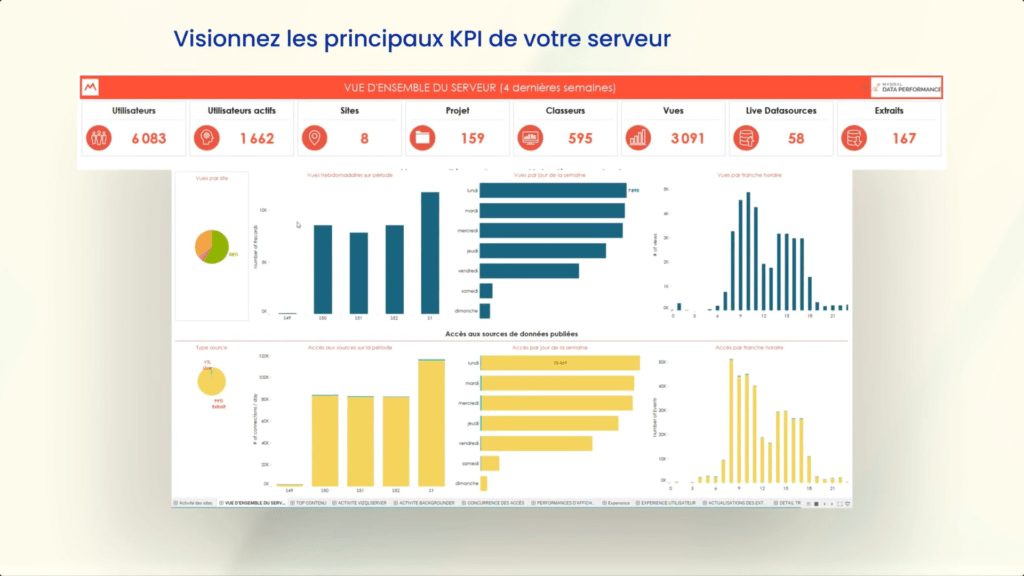
Pourquoi Tableau Performance Management est-il utile pour vous ?
De manière habile, cette solution répond à vos besoins et aux différents métiers : Socle, Développeur, Métier. Que vous soyez référent, concepteur, administrateur ou simple utilisateur, vous vous retrouvez dans l’analyse et dans les retours sur les axes de progression proposé par Tableau Performance Management.
Principalement, les actions sont d’améliorer la disponibilité et améliorer la performance. Ainsi, des retours sont organisés et transmis par thématique. D’autre part, un indice de criticité est renseigné vous permettant d’évaluer les décisions à prendre dans l’immédiat ou celles pouvant être étudiées plus tard.
Concrètement, de quelles optimisations vais-je bénéficier ?
Nos interventions peuvent se faire sur site ou à distance. Dans de nombreux cas, les optimisations se font directement sur vos workbooks, grâce à une analyse poussée qui permet de rendre performant les sources de données, les champs calculés, les feuilles de calculs et de rendre l’affichage de vos vues immédiat.
Par exemple, lors de la conceptualisation du classeur, toutes les données étaient actualisées à l’heure. En sélectionnant et en isolant certains extraits de données, il est possible de les rafraichir dans la nuit afin de réduire les coûts sur Tableau Server.
Enfin, des recommandations personnalisées seront faites en fonction de votre besoin et de vos créations existantes.
Vous souhaitez en savoir davantage ?
Tableau Performance Management
Author Profile

- Louis Lutz est chargé de projets en Marketing & Data Analyst, avec une aspiration naturelle dans l’univers de la data. Son expertise s'étend à la gestion et mise en place de projets marketing jusqu’à l'analyse de données. Au sein de Mydral, Louis se consacre à l'optimisation des campagnes menés par les départements, à la génération de leads qualifiés et à l'amélioration continue des performances marketing afin de maximiser l'impact et l'efficacité des actions entreprises.
Latest entries
 Actualités2 juillet 2024Tableau Performance Management : Un pas vers l’optimisation de vos actifs Tableau
 Actualités13 novembre 2023[Nouveautés] Tableau 2023.3 – Découvrez la version !
 Webinars23 octobre 2023Introduction à l’analytique embarquée
 Actualités29 septembre 2023Retour en images : Salon du Big Data Paris 2023